

Smart Scan Make Order Processing Effortless with Agentic AI
As modern retail channels grow, so does the volume of purchase orders, each with long SKU lists, different formats, and tight timelines. Not just OCR, Smart Scan uses Agentic AI to extract, match, and populate orders automatically, so teams spend time validating, not typing.
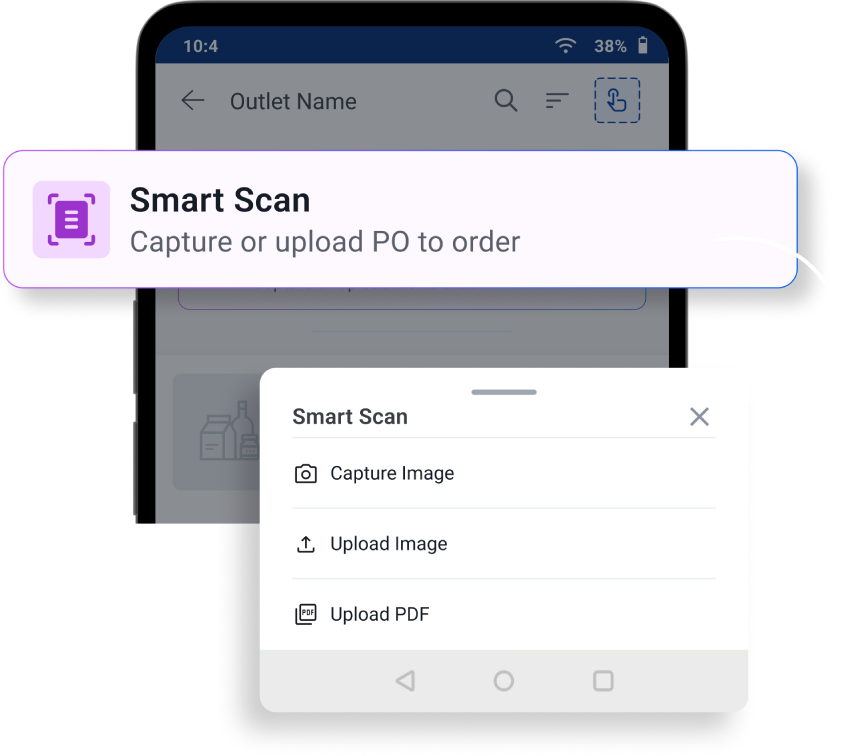



AI-Powered PO Automation Built for Sales and Distribution Teams
Smart Scan transforms purchase order processing from manual data entry into intelligent validation. Simply upload a PO and Smart Scan automatically extracts SKU and quantity information, matches products, and prepares orders for review.
Built For Results That Show Up In Execution
From sales teams to distributors and supply chain operations, Smart Scan improves speed, accuracy, and execution across the entire order fulfilment process.
Faster PO
processing
Order entry time drops dramatically, regardless of SKU count or PO format.
Order
accuracy
AI-driven extraction and SKU matching reduce transcription errors at source.
Selling time
per rep
Reps freed from data entry spend more visits on assortment, visibility, and coverage.
Without adding
headcount
Distributors and depots absorb peak-period order volumes without operational load increase.
Trusted by Leading CPG Brands
Global leaders across food, beverages, and consumer goods rely on Bizom’s real intelligence solutions to optimise their sales and distribution routes.








Orders Aren’t Slowing Down. Your Order Processing Shouldn’t Either.
See how Smart Scan handles real POs from modern trade chains and what that means for your team’s capacity.
FAQs
Smart-Scan accepts all common PO formats: PDF, PNG and JPG/JPEG, CSV, and XLS / XLSX.
Traditional OCR converts a document into raw text but has no understanding of what the text means. Smart-Scan goes steps further:
a.) It understands document structure. Tt knows which column is the SKU, which is the quantity, and which is the UoM, because each vendor template is mapped once by the ops team.
b.) It normalises vendor-specific language. For example, a vendor writing 'CS', 'Carton', or 'Master Case' all get mapped to Bizom's 'UoMs' automatically.
Yes, a one-time configuration is required per vendor. An ops admin creates a PO template for each vendor (e.g. Blinkit, Amazon, D-Mart) by mapping the vendor's column headers to Bizom's three core fields: SKU identifier, UoM, and quantity. They also map the vendor's UoM terminology (CS, Carton, EA, etc.) to Bizom's standard UoMs.
Once this template is saved, every future PO from that vendor is processed automatically
For a new vendor, setting up the PO template takes approximately 5–10 minutes. You need one sample PO from the vendor in hand. You can upload the sample, enter column headers, and map the vendor's UoM strings to Bizom's standard UoMs. Post this, the template is reusable indefinitely. If the vendor changes their PO format, the same process can be repeated.
Accuracy depends on two factors: the quality of the vendor template configuration and the quality of the uploaded document.
For a well-configured template and a clean, machine-printed PO (laser or thermal print), accuracy consistently exceeds 95% of line items extracted correctly with high confidence.
Smart Scan handles multi-page POs natively. The AI reads the entire document as a single context, so even if the column headers only appear on page 1 and the line items continue across 10 pages, the extraction is accurate across all pages. There is no page limit, though very large documents (50+ pages) may take a little longer to process.
Yes. The AI extraction is performed within Bizom's existing secure infrastructure, which is accessed through a private API endpoint. PO data processed by the AI model is not used for model training by Amazon or Mobisy. All data transfer is encrypted in transit.
